
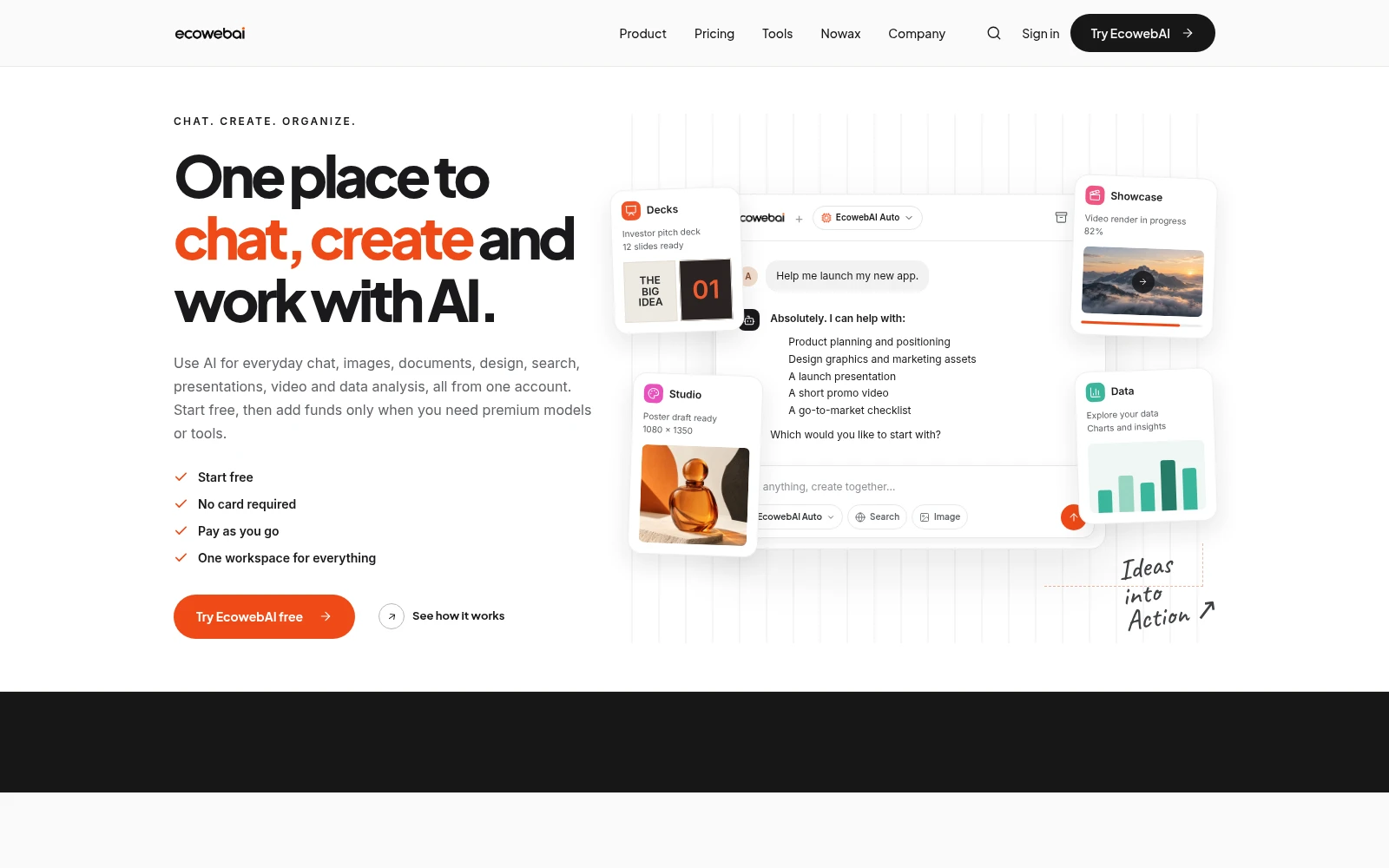
EcowebAI is introducing a Zimbabwe-built workspace for people who want to use artificial intelligence across writing, research, design and everyday work without managing each task in a separate application.
Available at ecowebai.com, the platform combines AI conversations with tools for working on documents, images, presentations, spreadsheets, videos and data. Users can start with free daily allowances and add wallet balance when they want premium capability, with EcoCash and Paynow offered as funding options.
Disclosure: EcowebAI was developed by STACKWIRE author Fortune Nowake and is owned by Ecowebzim. This launch introduction draws on the platform’s public pages and marketing material.
One account for the work around an idea
The starting point is familiar: open a conversation, ask a question and bring in supporting material when needed. EcowebAI adds a workspace around that interaction, with a library, folders and projects intended to keep conversations and outputs organised.
The company page describes a product built around the way a task changes shape. A question can become a plan; the plan may then need a presentation, a graphic, a report or a spreadsheet. Keeping those activities close together is the central proposition.
For example, someone preparing a small business launch could work on the message in chat, prepare a pitch deck and create promotional material within the same account. That is an illustration of the intended workflow, rather than a measured claim about how quickly a complete launch can be produced.
Choose a task before choosing a model
EcowebAI presents modes for different kinds of work, including quick responses, deeper reasoning, image understanding, documents, data and voice. Its Auto option is designed to route requests to a suitable model, while users can choose a more specific capability when the task calls for it.
The approach gives newcomers a way to begin without first comparing model specifications. The public pricing catalogue also exposes premium model families, giving more experienced users visibility into available choices.
The wider chat offering includes web search, weather and World Bank statistics. Uploaded documents and images can provide context for a conversation, extending the interface beyond text-only questions.
A dedicated workspace for data and research
One of the more distinctive parts of the release is the Data tool. EcowebAI describes a workflow that moves through exploration, preparation, analysis and sharing, aimed at students, researchers, analysts and businesses.
The tool supports opening CSV, TSV, JSON and Excel files in the browser. It also offers discovery of openly licensed datasets and World Bank figures, with publisher and licence information recorded alongside public data.
Its advertised features include previewing and undoing suggested cleaning steps, combining tables, asking questions in plain language, building charts and running statistical tests. Findings can be turned into reports, including PDF or Word output.
That makes it potentially useful for work that begins with a table rather than a blank prompt: organising survey responses, exploring a sales file or preparing a research report. The important habit remains to inspect the underlying data, transformations and calculations before relying on a conclusion.
Creative tools beyond the conversation
The platform’s tools directory groups creative work into dedicated spaces. Decks handles presentations; Publish focuses on reports, proposals and PDFs; Flows covers diagrams and architectures; and Sheets targets budgets, trackers and comparison tables.
Studio is positioned for posters, flyers, advertisements and branded graphics. Motion offers video generation from text and images, while Showcase focuses on product demonstrations, app walkthroughs and promotional videos. Transcribe converts audio into searchable text.
These categories give the product a broader purpose than answering questions. They are organised around the files and assets people need to produce after an initial conversation.
Free daily access, then pay as you go
According to its pricing page, EcowebAI offers free daily capacity without requiring a card. Premium work draws from a funded wallet, with top-ups advertised from US$5 and no monthly subscription required.
For Zimbabwean users, EcoCash and Paynow provide familiar routes to fund an account. The model also lets someone begin with free usage before deciding whether a premium task is worth paying for.
Free access is subject to allowances, and a wallet top-up is a balance rather than a promise of unlimited work. Users should check the current offering and usage information for the tools they plan to use.
Nowax extends the project into development work
EcowebAI also presents Nowax, a terminal coding companion for working with local projects and servers. Its marketing page labels it a development preview, with Windows x64 and supported Linux x64 options.
The page describes EcowebAI account sign-in, including device-code authentication for SSH sessions, and approval prompts for edits and terminal commands by default. That preview is a separate part of the product family, with its own installation requirements.
Starting with the workspace
EcowebAI works through a modern browser and offers installation on a phone or desktop as an app-like experience. Its privacy policy explains that AI requests may send relevant prompts, context and selected material to model or specialist providers. Browser-based file preparation should therefore be distinguished from the processing required for an AI request.
The release gives Zimbabwe’s local software scene another product to explore: a workspace built around practical outputs, flexible access and local payments. Readers can visit EcowebAI, review the available tools and begin with the free allowance.





Discussion
0 Comments
No approved comments yet. Start the conversation.